PCB Design Course
From Schematic to Manufacturing
This live practical PCB Design course helps students turn circuit ideas into manufacturable boards through KiCad, routing strategy, DRC, Gerbers, and production handoff.
Level: intermediate to advanced. Format: live online practical sessions. Best for learners who already understand basic electronics and want to build real hardware.
Almikatro Engineering Learning Path
From foundations to real engineering systems.
Engineering Fundamentals
Build the programming and electronics foundations required for modern engineering systems.
IoT Engineering with ESP32
Connect embedded systems to cloud platforms for monitoring and control.
Embedded Systems Engineering (STM32)
Control sensors, actuators, and machines using real-time firmware.
PCB Design
Transform circuit ideas into manufacturable electronic products.
PCB Design Roadmap
The course follows the real engineering workflow from requirements and schematic design to routing, DRC, and manufacturing.
 KiCad Workflow
Workflow Foundations
Requirements definition, KiCad basics, schematic capture, and design rules.
PCB Layout
Placement, routing, clearances, power design, clocks, reset, and interfaces.
Advanced Design
High-speed routing, USB, SPI, differential pairs, and ESP32/STM32 board design.
Manufacturing
DRC, Gerbers, fabrication workflow, and production-ready documentation.
How Training Works
Practical, guided, and project-based learning.
Live Online Sessions
Interactive sessions with instructor.
Hands-On Practice
Build real systems step-by-step.
Real Components
Work with sensors and hardware.
Guided Projects
Complete practical applications.
Support & Q&A
Ask questions during sessions.
Progressive Learning
Follow a structured learning path.
You Will Build Real Things
Students build practical boards that move from concept to manufacturing-ready output.
Power Module
Design a practical board with real power circuitry.
STM32 Sensor Board
Create a sensor interface board built around an STM32 MCU.
ESP32 Main Board
Design an ESP32 board with USB-to-serial and production-ready outputs.
See Real PCB Work in Reel Format
Since your clips are vertical, this page now uses reel-style video cards that make the PCB results feel more tangible and more natural to watch.
Industrial PCB and Enclosure Prototype
This video shows a real PCB and enclosure prototype prepared for an industrial use case, helping visitors see how the design moves from engineering work into a physical hardware result.
Inside the PCB Design Course
This clip gives visitors a closer feel for the PCB course itself, showing the kind of design workflow and practical board-development process students move through during training.
Real Products Designed with KiCad
This course uses KiCad, so these examples now come from official KiCad showcase projects that show how real boards move from idea to working hardware.
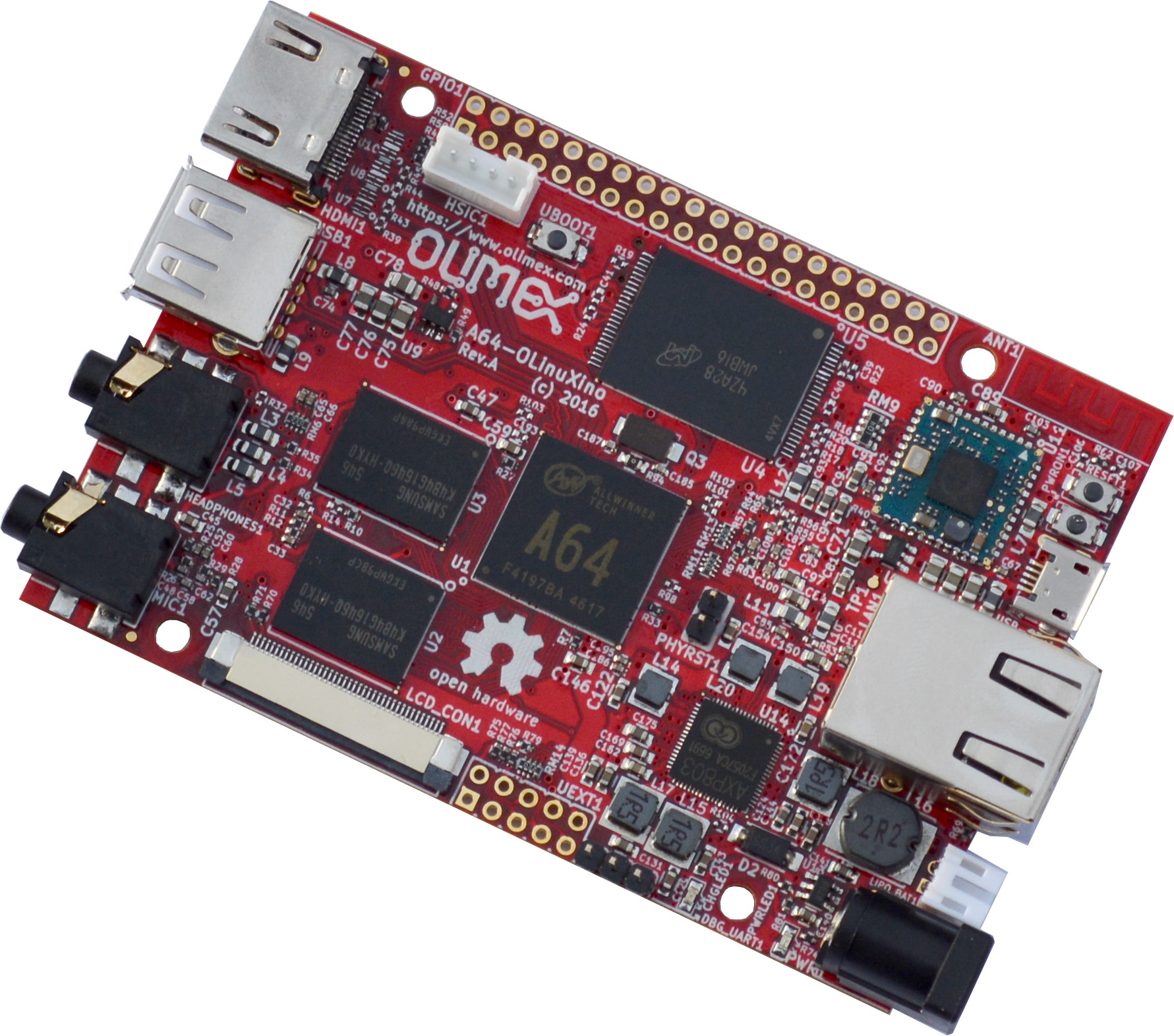
KiCad can support complete single-board computer design, not only small training boards
KiCad’s official A64-OLinuXino showcase highlights a Linux and Android single-board computer with DDR3 memory, wireless connectivity, Ethernet, HDMI, and audio. This is a strong example of how structured PCB workflow can support ambitious real hardware products.
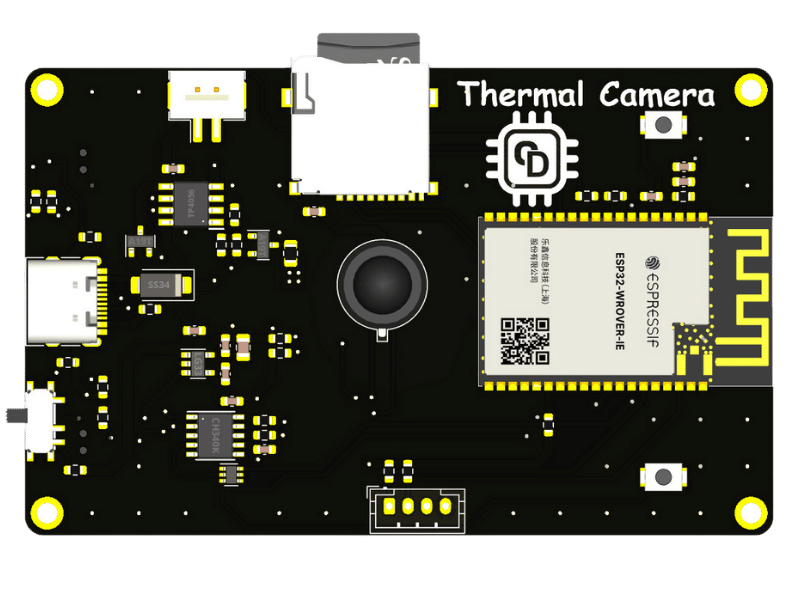
KiCad is also used for practical embedded hardware that combines PCB design with ESP32 systems
KiCad’s thermal camera showcase features a real ESP32-based board with an MLX90640 thermal sensor and on-device display. It is a great fit for this course because it connects PCB design directly to embedded systems, manufacturable hardware, and visible end-user value.
What To Expect Before You Join
A clear overview of the PCB Design course format, project style, and level before students apply.
Next Cohort
Applications are open now. The next live start date is shared after review of each application.
Format
Live online sessions with design walkthroughs and step-by-step board development.
Commitment
16 sessions focused on schematic capture, layout decisions, and manufacturing outputs.
Focus
KiCad workflow, routing strategy, DRC, Gerbers, and production-ready PCB delivery.
For Students Ready To Design Real Boards
This track is for learners who want to move from circuit ideas to manufacturable PCB designs using a structured engineering workflow.
Basic Electronics Understanding Recommended
Students should already understand fundamental electronics concepts and how schematic symbols relate to real components and system behavior.
How PCB Design Fits the Learning Path
PCB Design is usually the hardware step students take after strengthening their fundamentals and embedded knowledge. It pairs especially well with STM32 and ESP32 projects.
Recommended Pairings
STM32 Embedded Systems pairs well with PCB workflow for complete product development.
ESP32 IoT becomes more powerful when you can design your own boards.
Engineering Fundamentals is the best starting point if you still need electronics basics first.
Questions Students Usually Ask
The most common questions students ask before joining the PCB Design course.
Do I need to know KiCad before joining?
No. The workflow is taught during the course, but basic electronics understanding will help you move faster.
Will I learn manufacturing outputs too?
Yes. The course covers DRC, fabrication files, Gerbers, and the handoff process needed for real board production.
Is this useful for ESP32 or STM32 projects?
Yes. The course includes board-design thinking that supports embedded systems work and helps students turn prototypes into manufacturable hardware.
PCB Design Instructor
Focused on engineering-grade PCB workflow, KiCad-based design, manufacturability, and real board development from schematic to fabrication.
PCB Design Course
Standard track: 12000 DA · installments available for standard track
16 sessions · KiCad workflow · production-ready boards
PCB Design Course
Share your details and learning goals. Our team will contact you with the next available group, pricing details, and the steps to confirm your seat.